Building OpsFlow: My End-to-End AWS EKS DevOps Project
After working with AWS, Terraform, Docker, Kubernetes, and CI/CD individually, I wanted to build something that connected these technologies into one complete workflow.
That became OpsFlow.
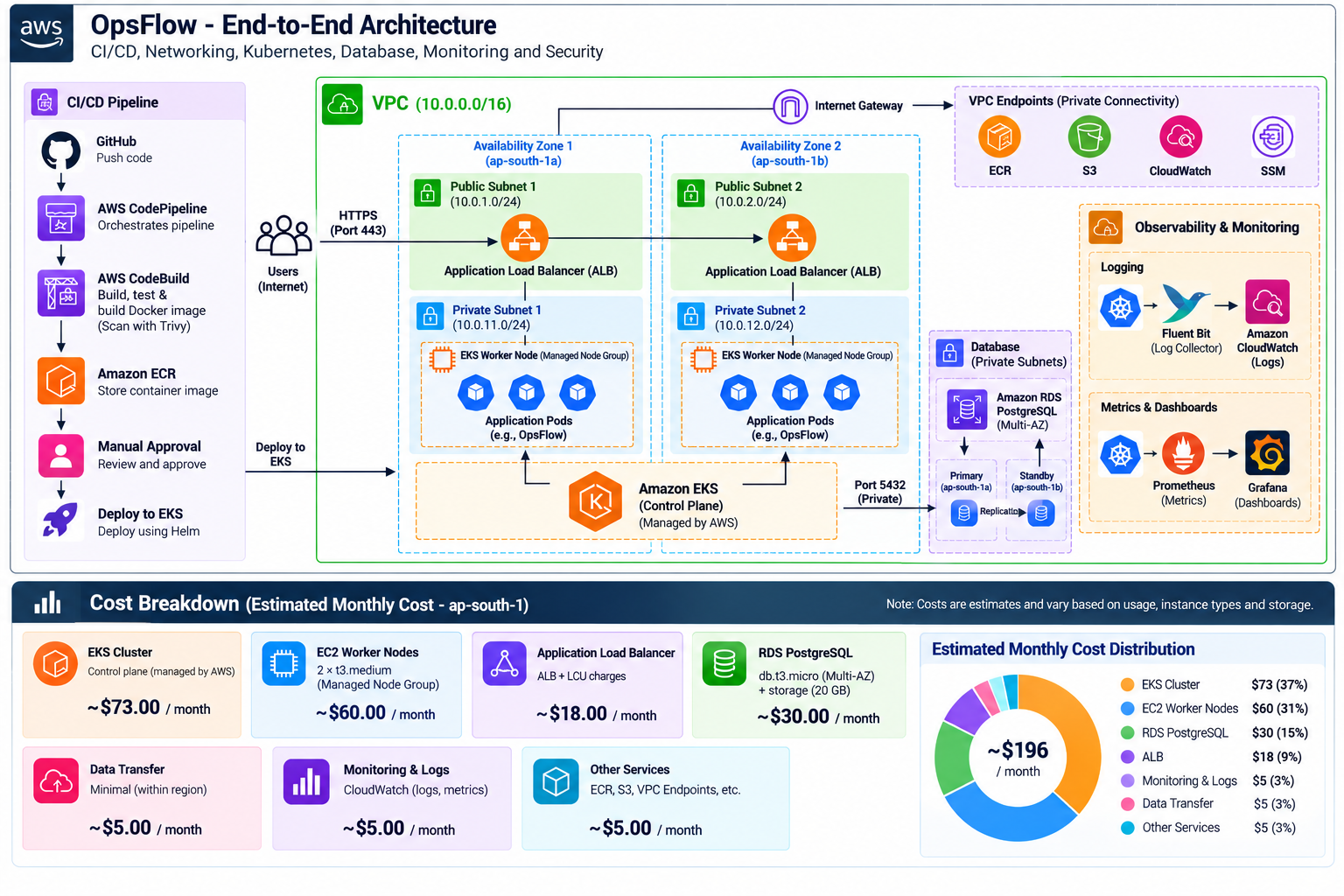
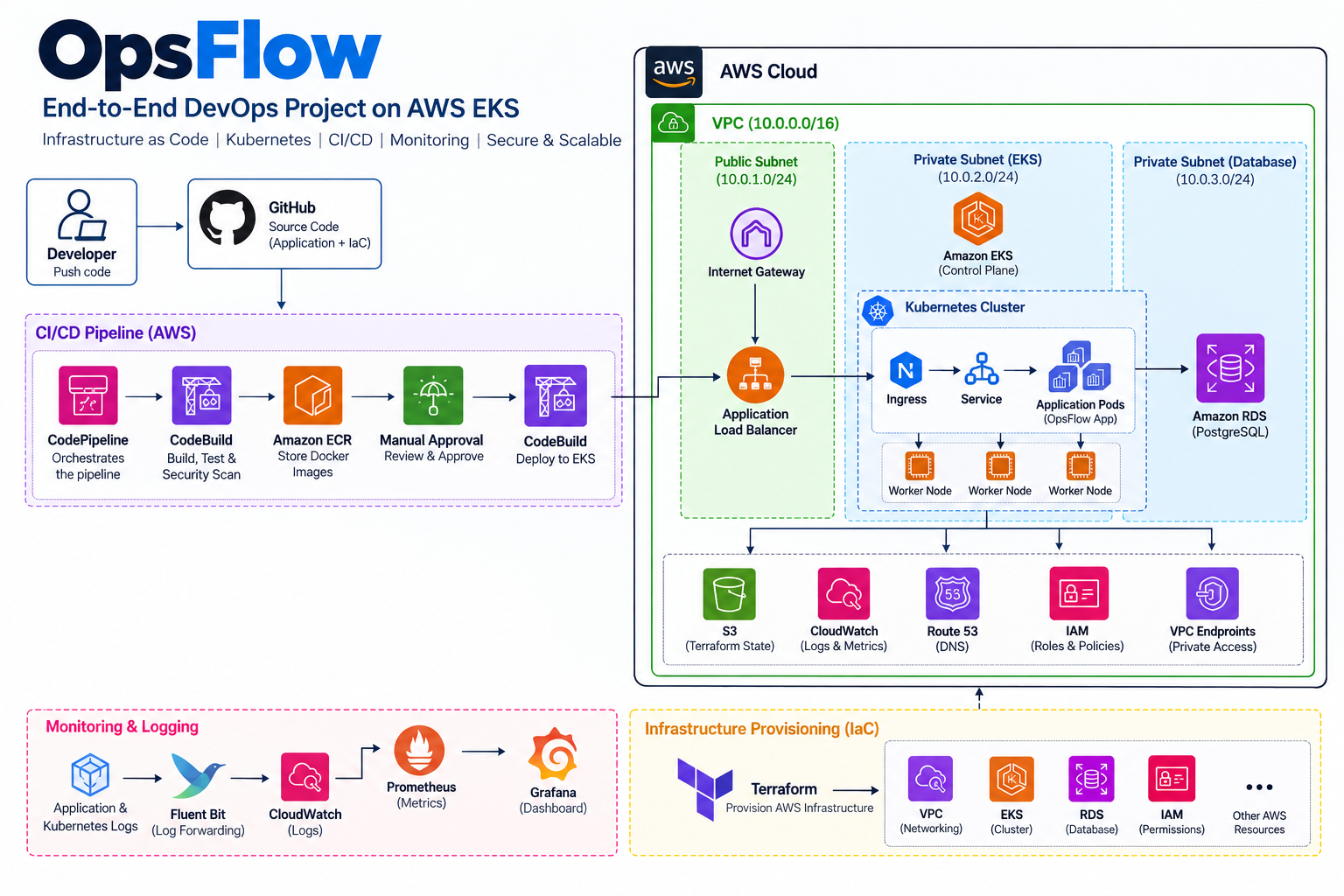
OpsFlow is an AWS EKS-based DevOps project that I built to understand how an application moves from source code to a running Kubernetes workload — including infrastructure provisioning, containerization, networking, database connectivity, deployment automation, security, monitoring, and cost considerations.
Instead of treating Kubernetes as an isolated tool, the goal was to understand the complete system around it.
This is the first post in my OpsFlow series. In this article, I'll introduce the project, the architecture, the technologies involved, and what I wanted to learn from building it.
Why I Built OpsFlow
I already had hands-on experience with AWS and Terraform, but I wanted more practical experience with Kubernetes and production-style DevOps workflows.
Running an application locally with Docker is useful.
Deploying a few Kubernetes manifests is also useful.
But a real cloud deployment involves much more:
Where does the Kubernetes cluster run?
How is the underlying AWS infrastructure created?
How do worker nodes communicate with AWS services?
Where are container images stored?
How does external traffic reach the application?
How does the application securely connect to a database?
How are deployments automated?
How are logs and metrics collected?
How do we introduce security checks?
How much does the infrastructure cost?
How do we destroy and recreate the environment safely?
I wanted one project where I could work through these questions instead of learning each tool separately.
That was the main idea behind OpsFlow.
What is OpsFlow?
OpsFlow is a containerized application deployed on Amazon EKS with supporting AWS and DevOps infrastructure.
The project combines infrastructure provisioning, Kubernetes, application deployment, CI/CD, observability, and security into one workflow.
At a high level, the system looks like this:
Developer
    |
    v
GitHub
    |
    +----------------------+
    |                      |
    v                      v
Terraform              CI/CD Pipeline
    |                      |
    v                      v
AWS Infrastructure      Build & Scan
                           |
                           v
                      Amazon ECR
                           |
                           v
                      Amazon EKS
                           |
                           v
                    Kubernetes Workloads
                           |
                 +---------+---------+
                 |                   |
                 v                   v
          Application Load      PostgreSQL
             Balancer              RDS
As the project developed, additional components were introduced for deployment management, logging, monitoring, security, and automation.
Core Technologies Used
The project uses several technologies, but each one has a specific purpose.
| Technology | Purpose |
|---|---|
| AWS | Cloud infrastructure |
| Amazon EKS | Managed Kubernetes control plane |
| Amazon ECR | Container image registry |
| Amazon RDS PostgreSQL | Application database |
| AWS ALB | External application traffic |
| IAM | AWS permissions and service access |
| VPC | Network isolation and connectivity |
| Terraform | Infrastructure provisioning |
| Docker | Application containerization |
| Kubernetes | Container orchestration |
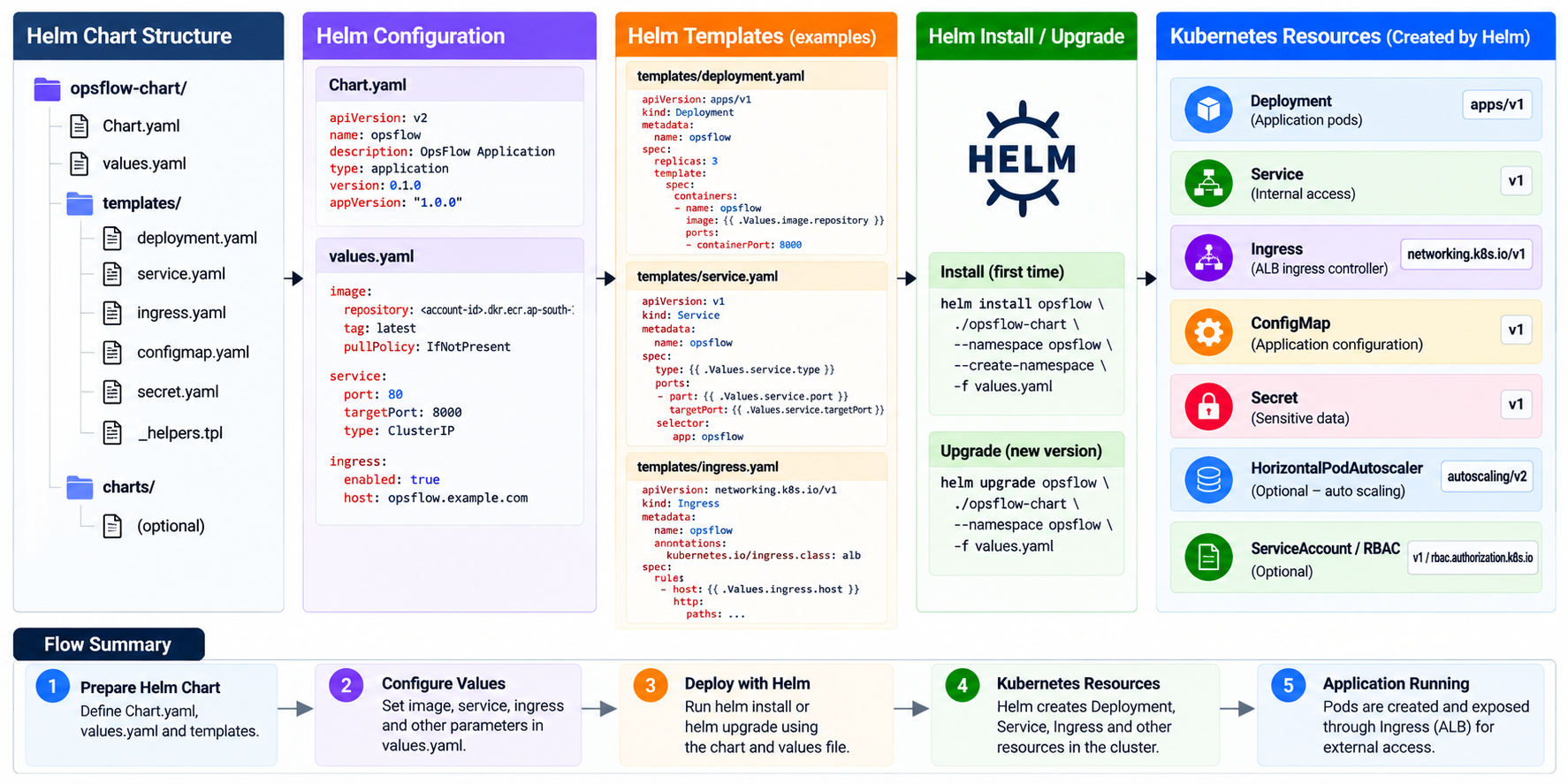
| Helm | Kubernetes application deployment |
| GitHub | Source control |
| AWS CodePipeline | Deployment pipeline orchestration |
| AWS CodeBuild | Build and deployment automation |
| CloudWatch | AWS logging and operational visibility |
| Fluent Bit | Kubernetes log forwarding |
| Prometheus | Metrics collection |
| Grafana | Metrics visualization |
The important part for me was not simply using these tools.
It was understanding how they connect.
Infrastructure as Code
One of the main decisions was to avoid manually creating the AWS infrastructure wherever possible.
The infrastructure is managed using Terraform.
This makes the environment reproducible and gives infrastructure changes the same advantages as application code:
version control
repeatability
reviewable changes
predictable provisioning
easier cleanup
The Terraform configuration provisions the AWS foundation required by the platform.
A simplified workflow is:
terraform init
terraform validate
terraform plan
terraform apply
Later in the series, I'll go through the actual Terraform structure and explain why the infrastructure was designed the way it was.
Kubernetes with Amazon EKS
The main platform for OpsFlow is Amazon EKS.
EKS provides the managed Kubernetes control plane while worker nodes run the actual application workloads.
The cluster used multiple worker nodes rather than treating Kubernetes as a single-server deployment.
After provisioning the cluster, one of the first verification steps was:
kubectl get nodes
The expected result was multiple nodes in the Ready state.

From there, the project moved into actual Kubernetes operations:
kubectl get pods -A
kubectl get deployments -A
kubectl get svc -A
These simple commands became important throughout the project because deployment wasn't considered successful just because Terraform or a pipeline returned a success message.
The actual Kubernetes resources also had to be verified.
Container Image Workflow
The application is packaged as a Docker image.
Instead of building an image and manually copying it to a server, the container image is stored in Amazon ECR.
The general flow became:
Application Code
      |
      v
Docker Build
      |
      v
Amazon ECR
      |
      v
Amazon EKS
      |
      v
Kubernetes Pod
This is much closer to how containerized applications are handled in real deployment environments.

Application Traffic
Running a pod doesn't automatically make an application usable from the internet.
OpsFlow therefore needed an ingress path.
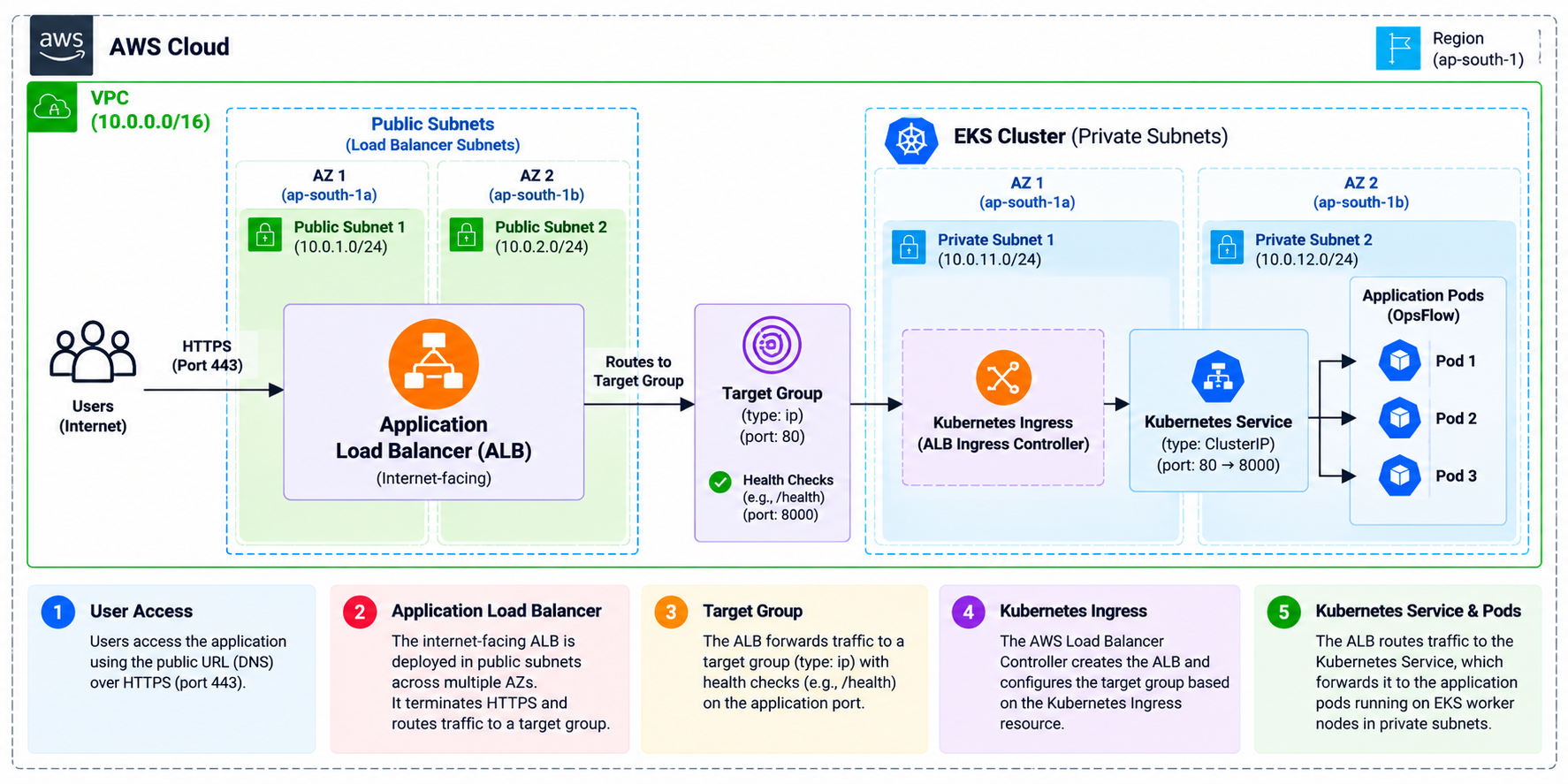
The project uses the AWS Load Balancer Controller to integrate Kubernetes with an AWS Application Load Balancer.
The traffic flow is roughly:
User
 |
 v
AWS Application Load Balancer
 |
 v
Kubernetes Ingress
 |
 v
Kubernetes Service
 |
 v
Application Pods
This part of the project helped me understand the relationship between Kubernetes networking objects and AWS networking resources.
I'll cover this separately because debugging ingress, services, target groups, and health checks is an important Kubernetes skill by itself.
Database Layer
The application also needed persistent relational data.
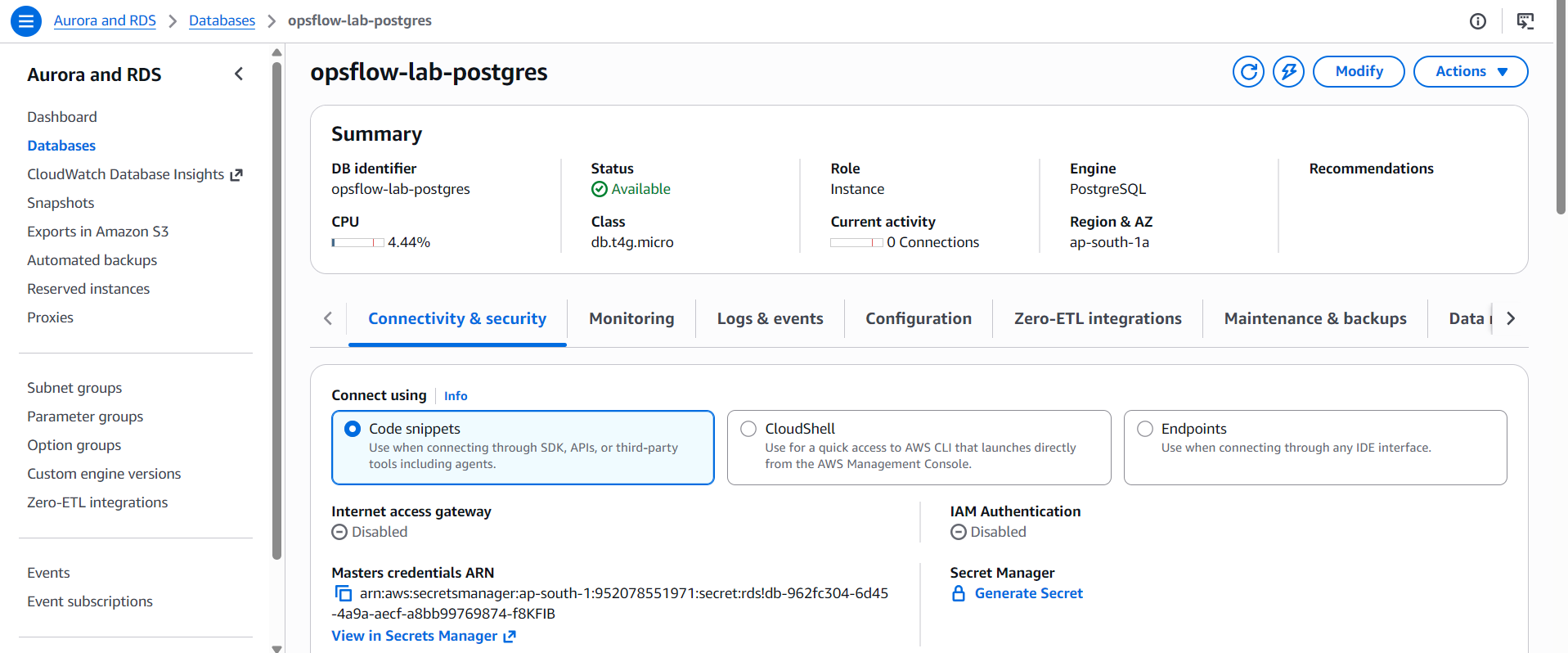
For this, OpsFlow uses Amazon RDS for PostgreSQL.
The database was kept private rather than exposing PostgreSQL directly to the internet.
The application running inside EKS communicates with RDS through the AWS network.
Application Pod
      |
      v
Kubernetes Node / VPC
      |
      v
Private RDS PostgreSQL
Database connectivity was also verified rather than simply assuming that successful infrastructure creation meant the application could communicate with PostgreSQL.
TLS connectivity was part of that verification.
CI/CD
Another major goal was to move away from manual deployment.
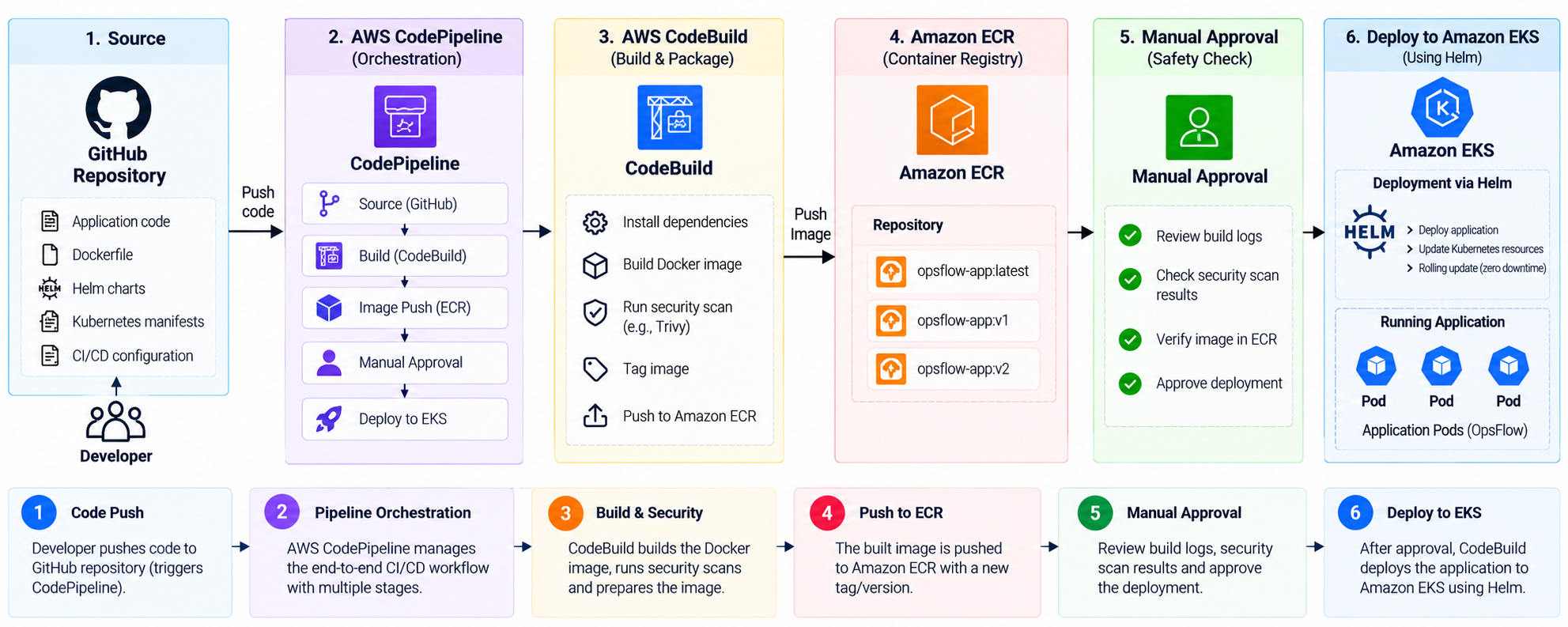
OpsFlow eventually uses an AWS-native CI/CD workflow involving:
GitHub
   |
   v
AWS CodePipeline
   |
   v
AWS CodeBuild
   |
   v
Build + Security Checks
   |
   v
Amazon ECR
   |
   v
Manual Approval
   |
   v
Deployment Stage
   |
   v
Amazon EKS
The pipeline separates build activities from deployment activities rather than giving one process unnecessary access to everything.
Container images are also passed through the deployment process using immutable image information instead of relying only on a mutable tag.
I'll dedicate a complete post to this because CI/CD becomes much more interesting once IAM, private EKS access, container registries, security scanning, and deployment automation are involved.
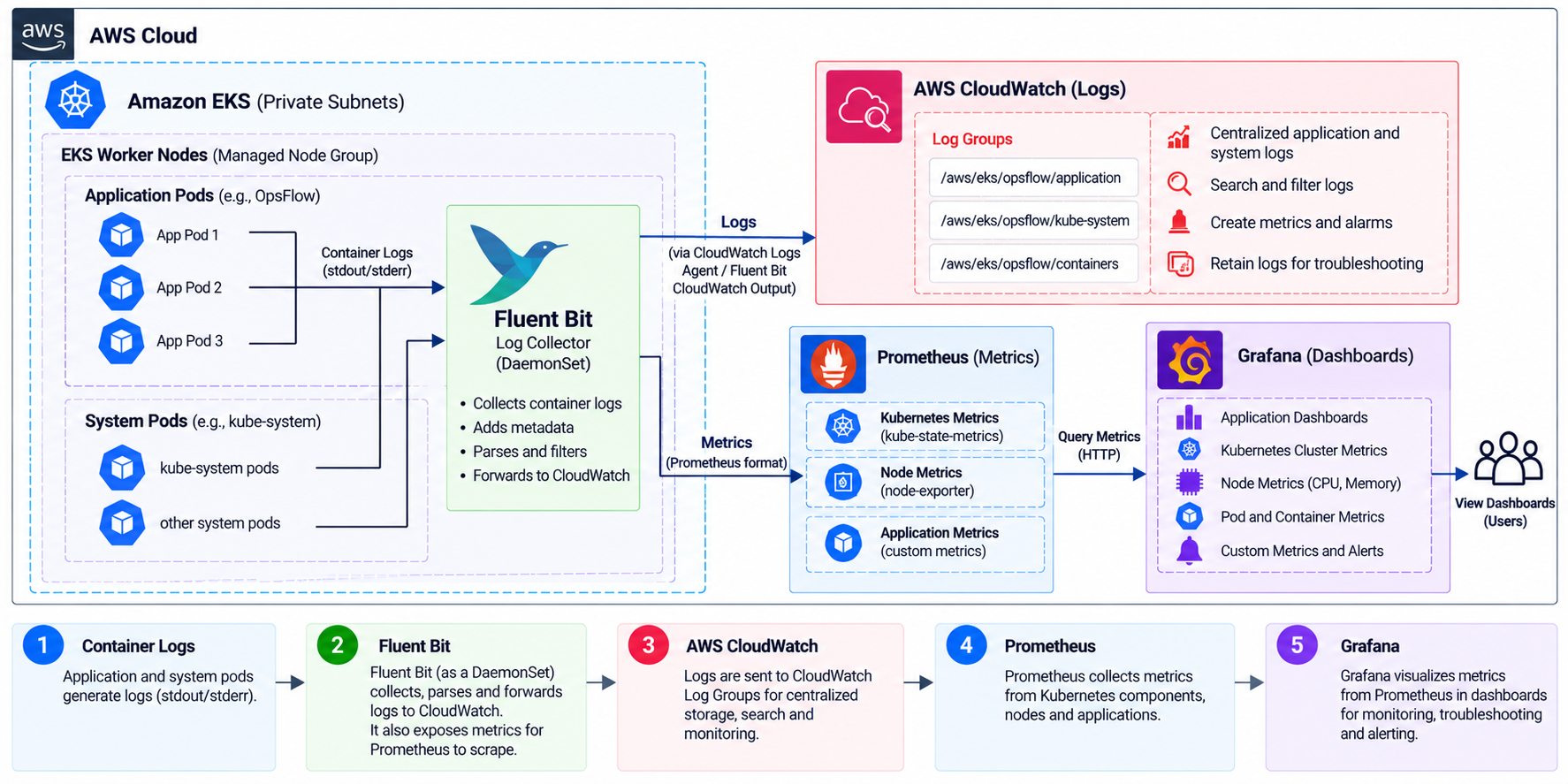
Observability
Deploying an application is only half the work.
Once it is running, we need to know what is happening inside the platform.
OpsFlow includes an observability design using:
Kubernetes Logs
      |
      v
Fluent Bit
      |
      v
CloudWatch
and a Kubernetes monitoring stack built around:
Kubernetes
    |
    v
Prometheus
    |
    v
Grafana
This introduced another important DevOps principle:
A deployment isn't complete just because the application is running. It also needs to be observable.
What I Learned While Building It
The biggest lesson from OpsFlow wasn't a particular Kubernetes command.
It was understanding how the different layers depend on each other.
For example, an application deployment can fail even when the Docker image is perfectly valid.
The problem could instead be:
Kubernetes configuration
IAM permissions
security groups
database connectivity
DNS
load balancer health checks
environment variables
container configuration
network routing
CI/CD permissions
That changes the way you troubleshoot.
Instead of asking:
"Why isn't Kubernetes working?"
you start asking:
"At which layer is the request or deployment failing?"
That is a much more useful way to approach cloud infrastructure problems.
What This Series Will Cover
Rather than putting the entire project into one huge article, I'm breaking OpsFlow into a series.
I'll cover the project from the AWS foundation all the way to the final operational workflow, including:
Introducing OpsFlow and its architecture
Building the AWS foundation with Terraform
Creating the Amazon EKS platform
Containerizing and deploying the application
Connecting EKS with PostgreSQL on RDS
Exposing the application using ALB and Kubernetes Ingress
Managing Kubernetes deployments with Helm
Building the AWS CI/CD pipeline
Adding observability and DevSecOps practices
Cost optimization, lessons learned, and the final OpsFlow workflow
I'll include the actual commands, configurations, screenshots, architecture decisions, verification steps, and problems I encountered while building the project.
Final Thoughts
OpsFlow started as a way for me to improve my Kubernetes and EKS knowledge.
But while building it, the project became much more about understanding how a complete cloud platform works.
Terraform creates the infrastructure.
Docker packages the application.
ECR stores the images.
EKS runs the workloads.
RDS handles persistent application data.
ALB exposes the application.
Helm manages deployments.
CI/CD automates delivery.
Logging and monitoring provide operational visibility.
And IAM, networking, security controls, and cost considerations exist across all of those layers.
That end-to-end connection is what made this project useful for me.
In the next article, I'll start from the infrastructure layer and walk through how I built the AWS foundation for OpsFlow using Terraform.